
Design cards visually, print them anywhere
A browser-based card designer that connects directly to your roster. Preview with real data, design with a full toolkit, and print from anywhere — no desktop software to install, ever.
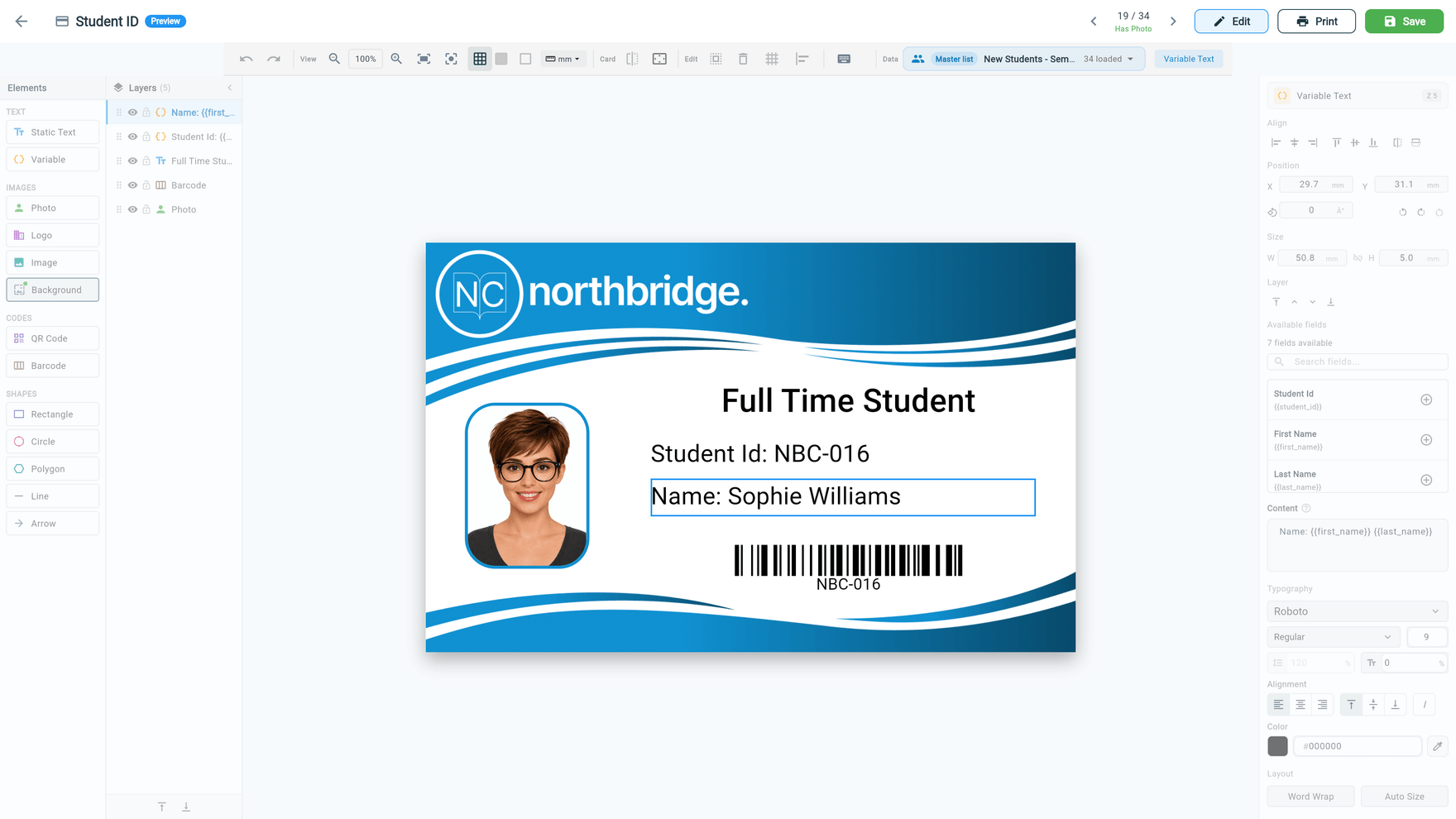
Stop installing desktop badge software
Desktop card design software is a relic. Windows-only installs that crash when you update your OS. Single-station licences that lock you to one computer. Disconnected from your roster so you're manually importing CSVs and matching photos by filename. And when the vendor stops updating, you're stuck with a tool that doesn't work on modern systems.
CaptrID's card designer runs entirely in your browser. It's always available, always up to date, and connected directly to your people data. Design from any computer — your office desktop, a laptop at home, or a tablet on site. No installs, no licence keys, no version conflicts.
A proper design toolkit
Place text fields, photos, images, shapes, barcodes, and QR codes on a visual canvas. Use the layers panel to manage element ordering. Align and distribute elements with snap-to-grid and alignment guides. Set precise positions and dimensions in the property inspector. Keyboard shortcuts for common actions — copy, paste, nudge, delete, undo, redo.
Photos render at the correct aspect ratio with configurable fit modes — cover, contain, or stretch. Background images span the full card bleed. Barcodes and QR codes generate from template variables so every card gets a unique code. Dual-sided cards let you design front and back independently, with separate elements and layouts for each.
Preview with real data
The live preview panel shows your card rendered with actual roster data — real names, real photos, real field values. Cycle through people to see how the design handles long names, missing fields, and different photo compositions. Catch layout issues before you print 500 cards, not after.
Template variables map directly to your roster fields. Add a text element, bind it to {first_name}, and it populates with each person's data at print time. The variable system supports any field from your master list or session — names, IDs, departments, dates, custom fields.
Organisation templates and session templates
Create shared templates at the organisation level for consistency across all sessions — your standard staff ID, student card, or visitor badge. These templates are available to any session and maintain a single source of truth for your card design.
For special events, one-off photo days, or sessions with unique fields, create session-specific templates. These live alongside the session and can have their own field mappings and default values without affecting your org-wide templates.
CaptrID automatically detects which templates are compatible with a session's fields. If a session has the fields a template needs, it shows up as available. No manual compatibility management — it just works.
Print from anywhere in the app
You don't have to navigate to a separate print screen. From a person's profile, click to print their card with any compatible template. From a session roster, select people and bulk print with filters — by status, by field value, or all at once. From a master list, select records and export.
Output options include PDF export for any card printer, or direct printing to a USB or network-connected card printer via the companion utility. For smart card encoding, the chip is written in the same pass as the print — one job, one card, ready to use.
Built for ID cards, not general-purpose design
The designer is purpose-built for CR-80 card dimensions (85.6mm × 54mm) — the standard credit card size used by every card printer. Page setup handles margins and bleed so your output matches what the printer expects. No guessing at dimensions, no manual scaling, no trial-and-error with paper sizes.
Key capabilities
Full design toolkit
Text, images, photos, shapes, barcodes, and QR codes on a visual canvas. Layers, alignment, snap-to-grid, keyboard shortcuts.
Live data preview
Preview your design with real roster data — photos, names, fields. Cycle through people to catch layout issues before printing.
Organisation & session templates
Shared org-wide templates for consistency, plus per-session templates for special events. Both with independent field mappings.
Dual-sided cards
Design front and back independently. Configure page layout, margins, and bleed for print output.
Quick actions from rosters
Print a single card from a person's profile, or bulk print with filters. Select people, pick a template, export.
Print-ready output
Export as PDF for any printer, or print directly to a card printer via USB or network with smart card encoding.