
Print ID cards from your browser
Design, preview, and print — all from the admin portal. Export a PDF for simple printing on any card printer, or use the lightweight companion utility for smart card encoding and advanced printer features.
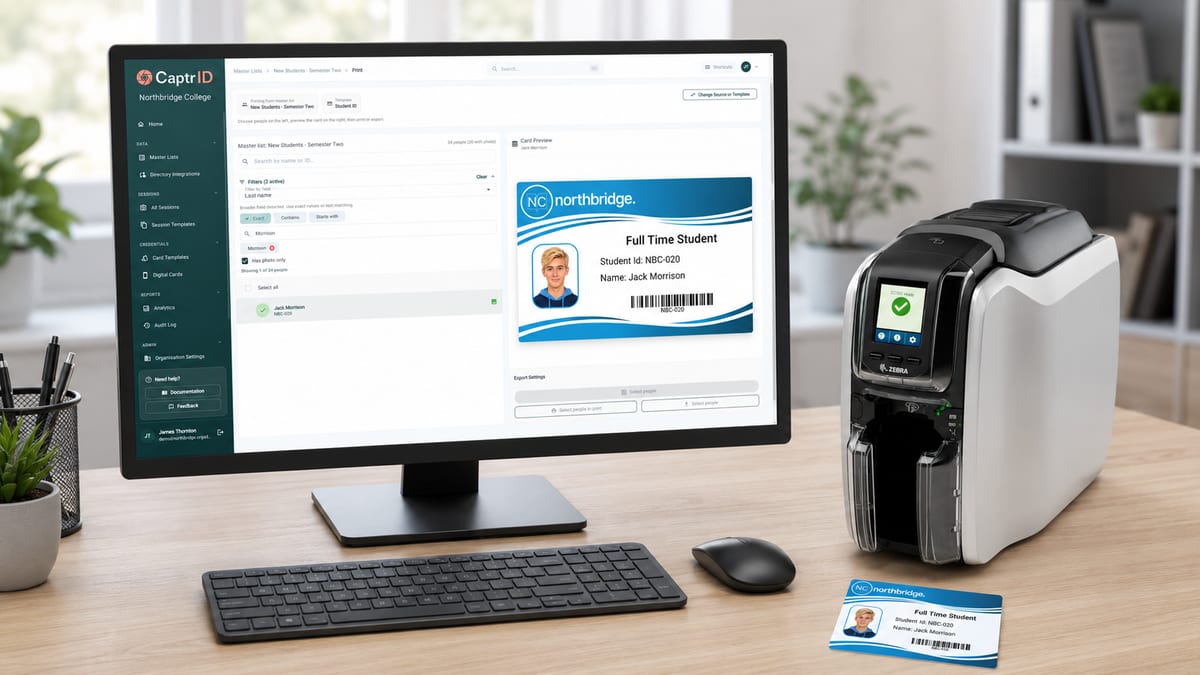
Truly browser-based card printing
Most ID card software requires installing a desktop application — often Windows-only — just to design and print cards. CaptrID runs entirely in your browser. Design your card with the visual editor, select people from your roster, preview, and print. For basic cards, export a print-ready PDF and send it to any card printer you have.
A lightweight companion utility runs on the computer connected to your card printer. It handles smart card encoding, direct printing from the browser to USB and network printers, and gives you full control over printer properties. The admin portal stays in control — you never leave the browser to manage a print job.
NFC cards that verify identity
CaptrID can write a secure verification URL to the NFC chip inside your cards. When someone taps the card on any NFC-enabled phone, the browser opens a live verification portal displaying the holder's verified identity — their photo, name, role, and organisation. No app required on the verifier's phone. No special hardware. The same verification portal that powers your digital wallet IDs works for physical cards too.
The verification portal pulls live data from your organisation's records — not a static snapshot. If a person's role changes, their credential is revoked, or their card is suspended, the verification page reflects that immediately. Each scan is cryptographically validated using HMAC-signed tokens embedded in the NFC chip, so a copied or tampered URL won't pass verification. Scan events are logged for audit, with privacy-preserving verifier context.
Organisations can configure which fields appear on the verification page beyond the defaults. If your verifiers need to see a department, clearance level, credential expiry, or any other field from your roster, you can include it — giving the people scanning cards exactly the information they need to make a decision.
This turns every printed card into a verifiable credential. A receptionist taps the card to confirm a visitor. A client taps a support worker's card at their door. A site supervisor taps a contractor's badge on arrival. Instant verification on any modern smartphone.
Enrol cards for existing systems
Many organisations already use contactless card readers — for door access, photocopiers, bus systems, lockers, library kiosks, and time and attendance. CaptrID captures the card's unique serial number (CSN) during printing and can write identity data to the chip, so the card comes out ready to enrol in your existing systems.
MIFARE Classic is the most common format for existing card reader infrastructure. CaptrID writes identity data to the card's sectors and registers the CSN against the person in your roster. That CSN can then be synced to peripheral systems — for example, pushed to Microsoft Entra ID as an extension attribute — so your access control, photocopier fleet, or locker system can pick it up automatically. One print job, one card, enrolled everywhere.
DESFire EV3 is the modern standard for organisations that need encrypted, multi-purpose cards. CaptrID provides configurable encoding profiles — you define which applications to write to the card during printing, with full control over AES-128 encryption keys, file structures, and access rights. Your access control vendor, library system, or parking provider can each have their own isolated application on the same card, written in a single pass. CaptrID can also capture the card's identity for enrolment in external systems that manage their own chip personalisation separately.
HID iCLASS and HID Prox are widely deployed in corporate and government access control. If your organisation uses HID readers for doors, lifts, or car parks, CaptrID can capture the card serial number during printing for enrolment in your access control system. iCLASS SE and SEOS encoding is on the roadmap for organisations that need credentials written to the card at print time.
Understanding NFC card technologies
NFC cards contain a small contactless chip inside the printed plastic. The type of chip determines what the card can do and which systems it works with.
| NTAG | MIFARE Classic | DESFire EV3 | HID iCLASS / SEOS | HID Prox (125kHz) | |
|---|---|---|---|---|---|
| What it does | Stores a URL that any phone can read by tapping | Stores identity data for existing card reader systems | Encrypted storage with multiple independent applications | Encrypted credentials for HID access control readers | Read-only serial number for legacy access control |
| Security | Minimal — URL is public | Standard — suitable for ID lookup | High — AES-128 encryption | High — proprietary HID encryption | Low — no encryption, serial only |
| Phone readable | Yes — any NFC phone | No — needs a card reader | No — needs a card reader | No — needs HID reader | No — needs 125kHz reader |
| Multi-purpose | Single use (URL or data) | Single system | Multiple independent systems on one card | Single system (HID ecosystem) | Single system |
| Best for | Tap-to-verify — like a QR code built into the card | Working with existing access control or attendance readers | Secure credentials, compliance, cards that serve multiple systems | Organisations with existing HID door readers | Legacy buildings with older proximity readers |
| Think of it as | A QR code built into the card | A contactless key for your existing readers | An encrypted USB drive on a card | A corporate access badge | The original proximity card |
Not sure which you need? If you just want tap-to-verify on phones, NTAG is the simplest option. If you have existing card readers, check what technology they use — MIFARE Classic and HID iCLASS/Prox are the most common installed bases. DESFire EV3 is for organisations that need encryption, compliance, or multiple applications on one card.
What gets written to the chip
The primary use case is the verification URL — a secure link to the holder's verified identity page, using the same infrastructure as CaptrID's digital wallet IDs. Tap the card on a phone, and the holder's photo, name, role, and organisation appear instantly.
Beyond the verification URL, you control what else goes on the chip. Write identity numbers, application data, or nothing at all — it depends on what your systems need. Encoding profiles are configurable per card technology and use case.
One card, multiple purposes
DESFire EV3 is the card that does everything. A single chip can carry a tap-to-verify application via CaptrID — so any phone can confirm the holder's identity — while also exposing a card serial number that legacy systems like photocopiers, lockers, and bus readers can use for enrolment, just like a traditional MIFARE Classic card. On top of that, there's space for additional secured applications — your access control vendor, library system, or parking provider can each write their own, isolated with independent AES-128 encryption keys.
Tap-to-verify on any phone. CSN enrolment for legacy peripherals. Secured applications for access control. All on one card, written in one print job, with no conflicts between systems.
The companion utility
For simple cards, you don't need anything extra — export a PDF from the browser and send it to your printer. But for smart card encoding, direct USB or network printing, and full printer control, a small companion utility runs quietly on the computer connected to your card printer.
It installs once, runs silently in the system tray, and stays out of your way. You never interact with it directly — everything is controlled from the admin portal. Select people, click print, and the companion utility handles the rest: encoding the chip, printing the card, and reporting results back to the browser in real time.
It also gives you direct access to your printer's native settings dialog — colour profiles, ribbon type, print quality — configured once and remembered for every job. No workarounds, no guessing at driver settings.
Key capabilities
Print from your browser
Design your card, select people from your roster, and print — all from the admin portal. No desktop software to install, no files to export and reimport.
PDF export for any printer
Export print-ready PDFs and send them to any card printer. Works with any setup — no companion utility needed for basic card printing.
Smart card encoding
A lightweight companion utility encodes NFC chips during printing — verification URLs, MIFARE keys, or DESFire applications. Encode and print in a single pass.
Tap-to-verify with NFC
A verification URL is stored on the card's chip. Anyone taps it with their phone and sees the holder's verified identity — no app, no reader, no infrastructure.
Native printer settings
Access your printer's native settings directly from the print screen. Colour profiles, ribbon type, holographic overlays — configured once, remembered for every job.
Sharp, durable text
Text and fine detail are printed using the resin panel on your ribbon — the same technique professional print bureaus use. No fuzzy edges, no fading.